WinOLS Maps: Understanding ECU Remapping 🔧🚗
In the world of ECU remapping, WinOLS stands out as a powerful tool for mechanics and professional tuners. This software allows for in-depth analysis and modification of ECU maps, enabling enhanced vehicle performance and efficiency. In this article, we will delve into the specifics of WinOLS maps, their functionality, and best practices for their use.
What are WinOLS Maps? ⚙️
WinOLS maps refer to the data files that contain the parameters controlling engine performance within an ECU. These maps can be modified to optimize various aspects of engine operation, including fuel injection, ignition timing, and turbo boost levels.
Key Features of WinOLS Maps 🔍
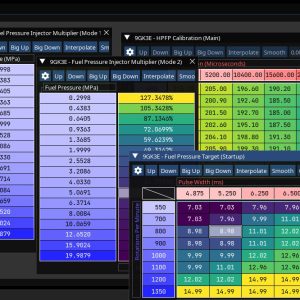
- ➡️ Data Visualization: WinOLS provides graphical representations of maps, making it easier to understand and modify complex data.
- ➡️ Map Recognition: The software can automatically identify maps within a binary file, streamlining the tuning process.
- ➡️ Multiple File Formats: WinOLS supports various ECU file formats, allowing versatility in tuning different vehicle models.
How to Use WinOLS for ECU Tuning 🚀
Using WinOLS effectively involves several steps:
- ➡️ Extracting ECU Data: Use tools like KESS3 or CMDFlash to read the ECU data and save it as a binary file.
- ➡️ Loading the File: Open the binary file in WinOLS to access the maps.
- ➡️ Modifying Maps: Analyze and adjust the maps based on desired performance outcomes.
- ➡️ Writing Back to ECU: After modifications, use the same tool to write the updated file back to the ECU.
Common Applications of WinOLS Maps 🔧
WinOLS maps are commonly used for:
- ➡️ Performance Enhancements: Increasing horsepower and torque for better acceleration.
- ➡️ Fuel Efficiency: Optimizing fuel maps to improve MPG.
- ➡️ Tuning for Aftermarket Components: Adjusting maps to accommodate modifications such as larger injectors or turbochargers.
Best Practices for Using WinOLS ❌✅
To ensure successful ECU remapping with WinOLS, consider the following best practices:
- ✅ Backup Original Files: Always save a copy of the original ECU file before making changes.
- ✅ Incremental Changes: Make small adjustments to maps and test the vehicle’s performance after each change.
- ❌ Avoid Over-Tuning: Excessive modifications can lead to engine damage or failure.
Conclusion 🛠️
WinOLS maps are an essential tool for professionals in the automotive tuning industry. Understanding how to utilize these maps effectively can lead to significant improvements in vehicle performance. For more advanced tuning tools and resources, explore our offerings at mastertuningtools.com.